 Carna
Generate a test
Four starting points, the settings that decide the questions, and the review screen where you approve each one. Nothing is saved until you say so.
Test Generation builds a test from your settings and hands it to you to check. It is in beta — the app says so at the top, and it means what it says: review every question before saving.
Open Test Generation in the left menu.
Four ways to start #
Everything you pick here can still be changed on the next screen.
- Custom Test — from scratch. You set every detail.
- From your coursebook — questions based on the book and the units you actually teach.
- MEB Curriculum (Maarif) — aligned with MEB learning outcomes.
- From common mistakes — built from the mistakes your students keep making. This is the one that uses the Mistakes tab in Reports, so it only has material once the class has submitted some work.
If your curriculum is none of these, there is a Share your curriculum with us link at the bottom. Carna adds the programme, grades and learning outcomes.
The settings that matter #
Level — A1.1 (Beginner), A1.2 (Elementary), A2 (Pre-Intermediate), B1, B1+ (Intermediate Plus), B2 (Upper-Intermediate), C1 (Advanced).
Categories — Vocabulary, Grammar, Listening, Reading, Writing.
Question types — Single Choice, Multiple Choice, True/False, Fill in the Blanks, Matching, Ordering, Categorization, Short Answer.
Number of questions — between 5 and 30.
Age group — 7-10, 11-14, 15-18 or Adult. This changes the situations in the questions, not the grammar.
Grammar rules — searchable, if you want the test pinned to specific rules rather than a whole category.
Voices — only used for listening. Pick an accent, or leave it on auto-cast.
Picture-choice question — only available when Single Choice is one of your question types.
Preview is locked until you have a level, at least one category and at least one question type. Those three are the minimum.
The review screen #
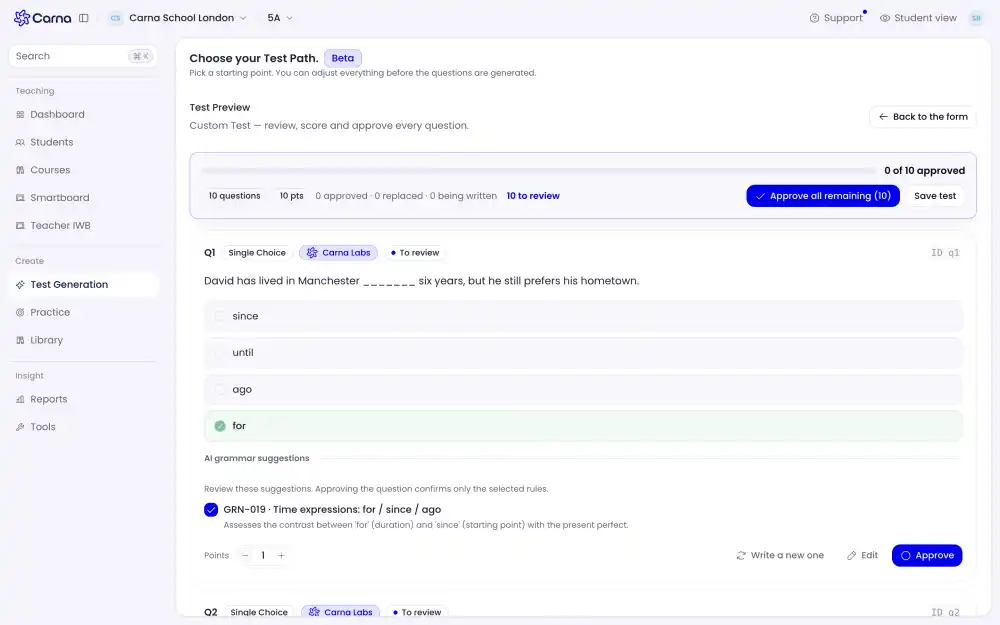
Press Preview Questions and the test is written in front of you. It streams: the header counts down "4 being written" and you can start reviewing the finished ones while the rest arrive.
For every question you get four choices:
- Approve — it goes in.
- Edit — change the wording or the options yourself.
- Write a new one — replace it with a different question on the same rule.
- Points — what the question is worth. The header total updates as you change it.
Each question carries the grammar rule it is testing, by id and name — for example GRN-019 · Time expressions: for / since / ago, with a line explaining what it assesses. The screen is explicit that approving the question confirms only the selected rules, so read the rule as well as the question: a question can be fine English and still be testing something other than what you wanted.
The header tracks approved · replaced · being written, and Approve all remaining takes the rest in one go.
Saving and assigning #
Nothing exists until you press Save test. Leaving the preview throws the questions away.
A saved test lands in Courses › Generated Tests. You assign it from there, the same way as any other module.