 Carna
Taking a student off your class list
Three different actions, and only one of them cannot be undone.
On the students list, each row has a ⋮ menu at the end. It holds three actions that sound similar and are not. They sit behind a menu rather than as buttons because a class of thirty would otherwise paint thirty destructive buttons on a page you are mostly there to read.
Remove #
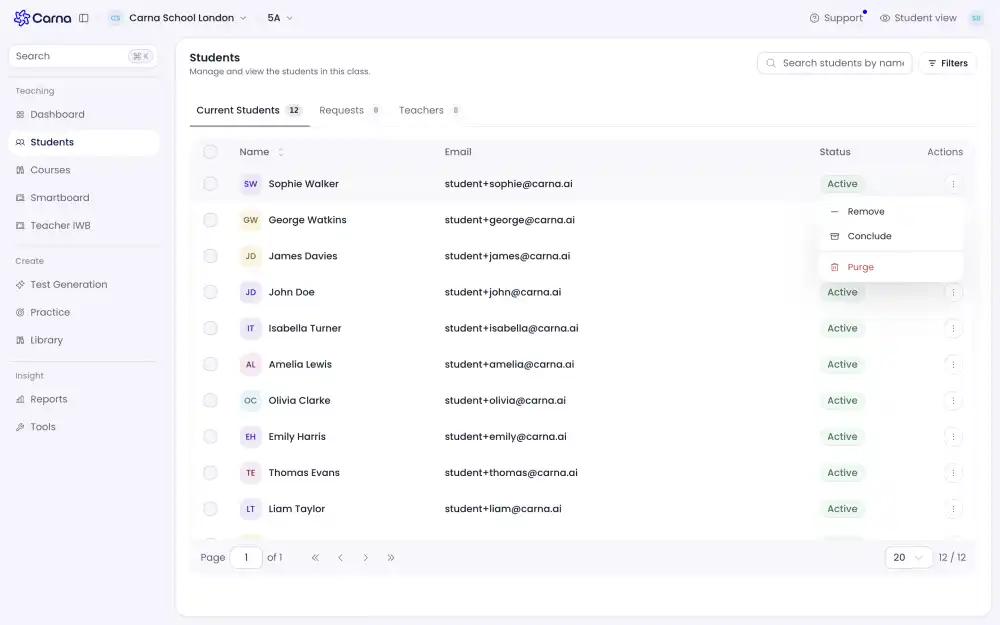
Takes the student off this class. Use it when somebody joined the wrong group or has moved to another teacher.
Conclude #
Marks the student as finished — a normal, intended ending, like the end of a term. It is not a punishment and it is not an error state. The row stays with a badge saying so, which is what keeps last year's class readable instead of empty.
Reach for this at the end of a course, rather than removing everybody.
Delete #
This one cannot be undone. It is the only action in the menu marked as destructive, and it is marked that way because it is the only one you cannot walk back. Use it for a row that should never have existed — a duplicate, a test account — not for a student who has simply finished.
If you are unsure between Conclude and Delete, the answer is Conclude.
Removing yourself or another teacher #
Teachers are a separate tab on the same page, with their own list. A class can have more than one teacher.