 Carna
Ask for a feature, or report something broken
Four request types, and the type is the routing. Plus the one thing that most often turns a request into a fix.
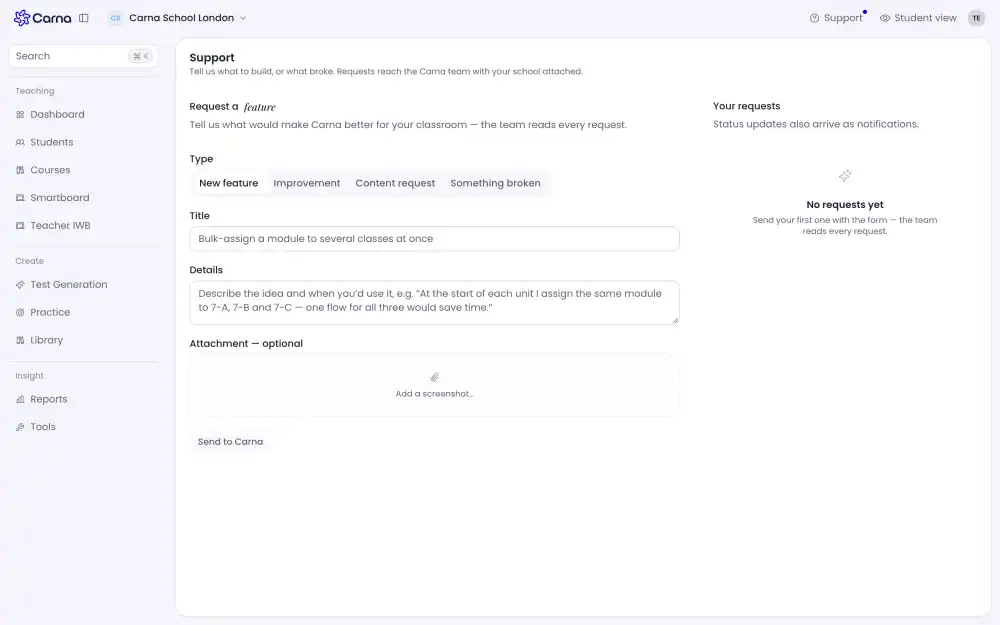
Carna has a form for this, inside the app. Open the account menu at the top right and choose Submit a Request, or go straight to /support.
Tell us what to build, or what broke. Requests reach the Carna team with your school attached.
Pick the right type #
Four, and they go to different places on our side:
- New feature — something Carna does not do yet.
- Improvement — something it does, badly or slowly.
- Content request — a book, a module or a unit you want in the catalogue.
- Something broken — a bug.
Choosing Something broken for a missing feature sends it to the queue that is watched for outages, and choosing New feature for a bug buries it in a queue that is reviewed weekly. The type is the routing.
Writing one that gets acted on #
Title — what you wanted to happen, in one line.
Details — for a bug, the three things nobody can work without: which class, which module or page, and what you saw instead. For a feature, what you were trying to do in the lesson, not the control you imagined.
Attachment — add a screenshot. It is optional and it is the single thing that most often turns a request into a fix in the same week.
Your school is attached automatically. You do not need to say who you are.
After you send it #
It appears under Your requests on the same page, and status updates also arrive as notifications — you do not have to come back and check.
If you need an answer now rather than a change later, this is the wrong door: use the assistant or write to support.